

Device Security is Not Working
For the average user, anyway


Today, I listened to my wife wrestle with the dark art of transferring a pop concert ticket to our daughter, although I am glad to inform you that after a valiant struggle, she emerged victorious. It clearly illustrated the ludicrous situation we have ended up in, thanks to our tech industry’s Frankenstein-style bolt-on attempts at providing device and account security.
I would like to clarify one point before I start, namely that I helped them out as much as I could. For most of this process, they went it alone because I was driving us all to a restaurant in the car.
Here’s the situation: my wife and my daughter both have Android phones and Google accounts. Neither of them has any technical understanding of the processes going on behind the scenes to (supposedly) secure their accounts.
My wife uses Ticketmaster to buy the ticket.
Then my daughter has to install the Android app for Ticketmaster to be able to receive it.
This requires approval from my wife using Google Family Link.
Activation of the Ticketmaster account requires setting up an account on the Ticketmaster website, so my wife takes my daughter’s phone and does this, using Google Chrome and selecting to use Google Password Manager to generate a secure password (because I have told her to in no uncertain terms, otherwise she’d use the name of one of our pet rats, or something equally insecure).
Then she hands my daughter her phone back and approves the transfer of the ticket to the new Ticketmaster account.
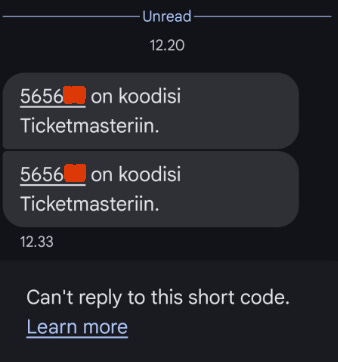
A while back, my wife accidentally entered my phone number rather than hers in the Ticketmaster app and has since been unable to work out how to change it. Note: I should do this for her. Whenever she does something requiring one of the worst forms of 2FA, namely an SMS one-time code, I have to read it to her from my phone. Such an SMS code is required to enable the ticket transfer process.
Still, an SMS 2FA is better than no 2FA, I suppose.
She has to request the SMS code twice over the next thirteen minutes, for some reason I don’t fully understand, and the code briefly pops up each time in a notification displayed over Google Maps. My phone is in the car phone holder, providing me with navigation information, and fortunately, this happens while we are driving along a clear, straight road with no traffic, so it is not too distracting.
Strangely, it was the same code that popped up, and I don’t know if this was a one-in-a-million occurrence or if Ticketmaster uses the same code every fifteen minutes or something equally rubbish. Note: that might be worth investigating.
After the transfer-out process is completed by my wife, my daughter has to go to her Google Gmail app to find an email about the transfer to initiate the transfer-in process. The email contains a blue link button for her to click. I have told my family numerous times that they are not to randomly click on links in emails, especially if they are related to financial matters such as banking or credit cards, without checking with me. After all, they are often phishing attempts.
Just this once, I forgive my daughter for clicking on the link without asking me, because the email was expected.
My daughter has her default browser set to DuckDuckGo, and so it does not have the Ticketmaster account password stored (remember: that was put in Google Chrome). They both struggle for ten minutes to work out if it is possible to see and copy the password, or to transfer the password store from Chrome to DuckDuckGo, and almost managed it, but my daughter can’t remember her Google account password. She never has to use it as she has the biometric fingerprint reader turned on, and it is stored for her by me, in a secure note in my Lastpass account.
(Note: check that they know the protocol I have set up to allow them access to my Lastpass account and all my other computer accounts and systems in the event of my unexpected demise.)
While driving and listening to their tempers fraying, I suggested to my daughter that she briefly change her default browser from DuckDuckGo to Chrome and try opening the link in the Gmail email again as a simple solution. I’m clever that way.
They have to search for how to do this, but after handing the phone back and forth several times, they eventually manage to open the link from the email on a logged-in page of the Ticketmaster web app in Chrome.
At this point, I leave the motorway and drive into the city of Turku, and so can no longer spare any attention on what they are doing, but it takes another ten minutes or so of angry exchanges before my daughter triumphantly announces, “I can now see the ticket!”
Total time to achieve a simple transfer of a pop concert ticket from one person to another: 45 minutes. I dread to think how many times they had to tap their screens - it must have been well over a hundred on each phone.
And people say that blockchain and crypto are complicated!
Note: I bet my daughter still has Google Chrome set as her default browser. I’ll ask her in a month or two, if I remember.
Appendix
Here is a list of the apps and web apps that they both ended up using:
Ticketmaster (x2)
Ticketmaster web app (x1)
Google Gmail
Google Family Link
Google Password Manager
Google Play
Google Chrome
SMS Messenger
DuckDuckGo
And here is a list of the security protocols used:
federated identity authentication
passwords and password managers
out-of-band challenge-response authentication
fingerprint biometric authentication
SMS one-time codes
All this technology, just to transfer a pop concert ticket from a mother to a daughter.
About the author
I am a blockchain researcher and an advisor to Resonance Security, a cybersecurity company providing full-spectrum security software and services for both corporate and personal users. We are working to make computer security less complicated and more secure than the mess you read about above.
I can't stop smiling reading this - it feels like a cross between a sitcom and a cybersecurity training session on wheels! The sheer faff of ticket transfers these days is next-level maddening. And it really shines a spotlight on how “user-friendly” tech... often isn’t. Especially when layers of security stack up like an overstuffed sandwich no one ordered. Have you ever tried to simplify this tangled process with your own tech stack? Or is it just easier to swear at the phone and carry on? 😉
So being an Apple fan boy I am wall-to-wall Apple and use 1Password on cloud with browser plug-ins across all devices with passkeys/biometrics whenever available. That all works fine with redundancy built in (multiple backups) and recovery process including total disaster (e.g., fire gets everything on site or devices get stolen ad/or compromised).
But try doing ANYTHING for a 90 year old relative with expired passport under power of attorney - quite frankly it is impossible to do anything, they might as well not exist. You can't even get a new passport as someone that old often can't open their eyes wide enough to get an acceptable photo for the upload. Any every bank or financial institution has a different process to prove identity under LPA.
There are two worlds now - those who can and those who can't do on line identity/security. And everyone who can has to try to support those who can't!